Data Annotation Made Easy: A Beginner's Guide

If you are just beginning to get acquainted with the world of machine learning and computer vision, you definitely need to know about data annotation. AI does not understand images, text, or video the way a human does. To learn how to recognize objects, find patterns, and respond correctly to various situations, a model needs examples with clear labels. And how well the model performs on new data directly depends on the quality of this work.
Quick Take
- Data annotation turns raw data into examples from which AI models learn to recognize objects, comprehend text, and execute tasks.
- An effective process begins with clear project requirements.
- Automated labeling speeds up work, but requires human verification.
- Regular quality control helps detect errors before they enter the training dataset.

What Does Data Annotation Look Like in a Real Project?
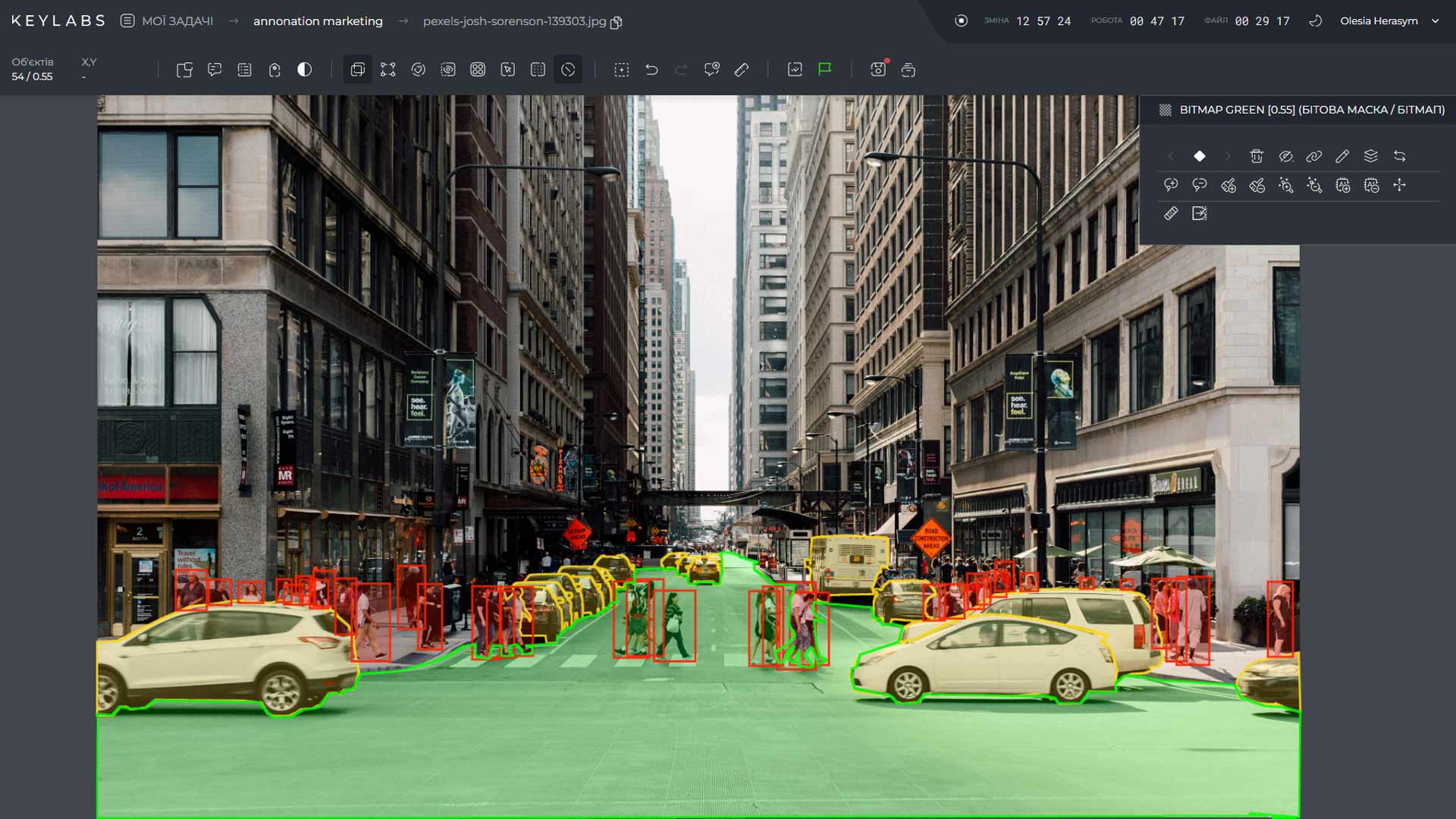
Data annotation is the process of adding labels to data that explain to an AI model what exactly it is seeing or how it should interpret information. For example, to teach a model to recognize cars on the road, you need to mark cars in thousands of images. For medical AI, specialists might highlight specific structures in scans, while for a language model, they classify texts or evaluate responses. Therefore, the type of annotation inherently depends on the task.
How to Organize the Annotation Process
Although specific workflows vary, most projects pass through several fundamental stages. First and foremost, you should start with the objective: what exactly is the model supposed to recognize or determine? The required data and how it should be labeled depend on this.
Next, the team prepares the data and defines the rules. They check file formats, duplicates, corrupted records, and data compliance with the task. At the same time, they create instructions for annotators: which categories to use, how to mark ambiguous cases, and what to do if an object cannot be identified with certainty. Clear examples and rules for complex situations help avoid different interpretations of the same task.
Then, a trial annotation phase is conducted. A small portion of the dataset is annotated to check that the instructions are clear and that the chosen tool is appropriate. If different annotators annotate the same objects differently, the problem may be due to unclear rules. It is cheaper to detect this early on than to rework thousands of ready-made examples.
After agreeing on the rules, the primary work begins. The team shares data, tracks progress, and verifies results. On large projects, automated models can produce preliminary markup that humans can correct or validate.
The final stage is auditing and preparing the deliverables. Here, the team corrects any errors found, checks the file structure and format to meet the requirements of the customer or training pipeline. The readiness of the dataset is determined by whether it can be used without additional corrections and ambiguities.

Most Popular Annotation Types
As established, the annotation method itself depends on what the model is supposed to learn.
- Image Classification. The simplest option – each image is assigned a category, such as "cat", "dog", or "car". This approach is suitable when you need to determine what is shown in a photo, but do not necessarily need to pinpoint the object's exact location.
- Bounding Boxes. Rectangles around objects. They help the model determine where pedestrians, cars, goods, or other items are positioned within an image.
- Polygons and Segmentation. Needed when a rectangle is insufficient. A polygon follows the exact outline of an object, while segmentation allows for even more precise labeling down to individual pixels. This is crucial for complex shapes, medical imaging, and multi-object scenes.
- Keypoint Annotation. This technique works like creating a geometric map. By placing precise reference points on joints, facial features, or key structural elements, it gives algorithms the precise spatial awareness needed to track body posture, analyze small movements, and detect subtle physical changes.
None of the annotation methods encountered compete with one another, because every project can be considered unique.
Choosing Annotation Tools in 2026
An annotation tool should be selected based on data type, task complexity, and workflow organization. Platform popularity alone does not guarantee that it will fit a specific project.
For simple image tasks, basic tools may suffice. However, for large teams with specific needs, collaboration, task allocation, access control, version history, result verification, and data export flexibility in the required format are essential.
Among such solutions, our proprietary platform, Keylabs, supports various visual and 3D annotation types. The main thing is that your chosen platform meets the critical criteria for your project.
Before making a final choice, it is worth running a pilot on a small sample of real data, including edge cases. Compare annotation speed, the number of corrections, review costs, and result compatibility with the downstream model training pipeline. This will allow you to select the most suitable solution.
Manual vs. Automated Annotation
Manual labeling is precision work: it is a lifesaver where data is complex or ambiguous. But it is always a long game, especially when you are facing thousands of frames or hours of video.
Automation, of course, provides a powerful boost – it automatically throws on bounding boxes, contours, or preliminary tags. However, blind trust is a mistake: the model can easily miss a subtle detail, outline boundaries poorly, or simply get confused in an off-script situation.
Therefore, in practice – including at Keymakr – both approaches are frequently combined. Tools execute repetitive labor, while humans review the suggested annotations and correct errors. This helps increase processed data volume without sacrificing quality control.
Special attention is paid to complex and rare edge cases. A partially occluded object, a blurry recording, unusual video behavior, or an ambiguous LLM response can prove far more critical to future system quality than hundreds of obvious examples.
FAQ
How much does data annotation cost?
It’s all individual: data type, complexity, and deadlines form the baseline. But the real cost is always higher than the 'price per label' because software licenses, PM work, and error correction get added on top.
How is data annotation quality measured?
It depends on the task. Sometimes it’s just a cross-check (when multiple people label the exact same thing), sometimes spot checks by lead annotators or auto-tests. There is no silver bullet: for images, geometric precision is what matters, while for text, it’s the absence of ambiguity.
When should data annotation be outsourced?
Outsourcing is the way to go when your in-house team can’t handle the volume, lacks specialized expertise, or doesn’t have the bandwidth to build a quality control system from scratch. The main thing before picking a vendor is to carefully review their security, QA processes, and case studies with similar data.
How much data annotation can be automated?
Algorithms are great at generating rough drafts and knocking out repetitive tasks. But nobody has canceled a reliable human-in-the-loop: on complex and ambiguous examples, AI without a human will still slip up for now.